From Apprenticeship to the Training Manual
A training manual is most useful when it helps staff make sound decisions at work. Learn how to shape clear instructions, updates and practice prompts.
The most common mistake with a training manual is treating it as a record of everything a trainer said. The result is a document that is hard to use at the moment of need, while important decisions remain buried in prose. A stronger manual is organised around the reader’s task: what to do, what to check and what to do when the situation does not fit.
Organise around tasks
A training manual is a working reference, not a transcript. Readers usually open it to complete a particular job, so group information under task names and put the action near the beginning. Background can help explain a rule, but it should not make someone search through several pages to find the next step.
Use headings that match the language staff use at work. A contents page, descriptive page titles and a searchable PDF can help readers find the right section; printed copies need clear tabs or a simple index. Keep terms consistent across the manual, forms and workplace systems, so readers do not have to guess whether two labels mean the same thing.
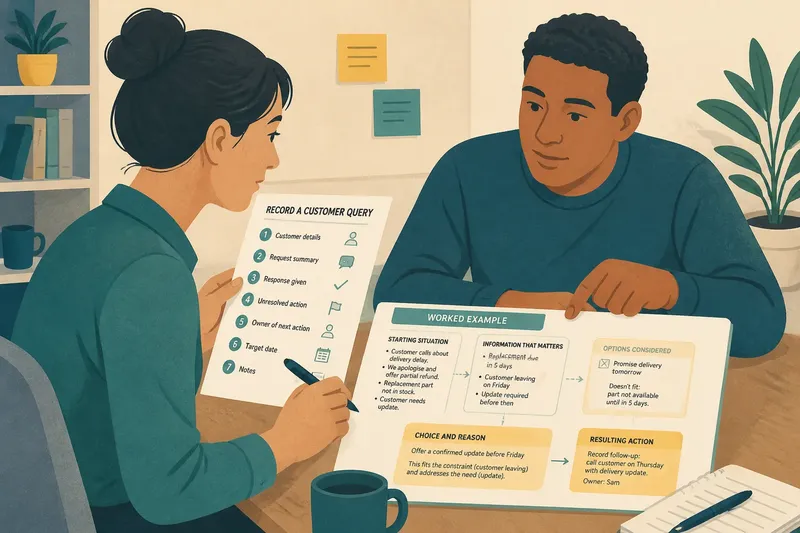
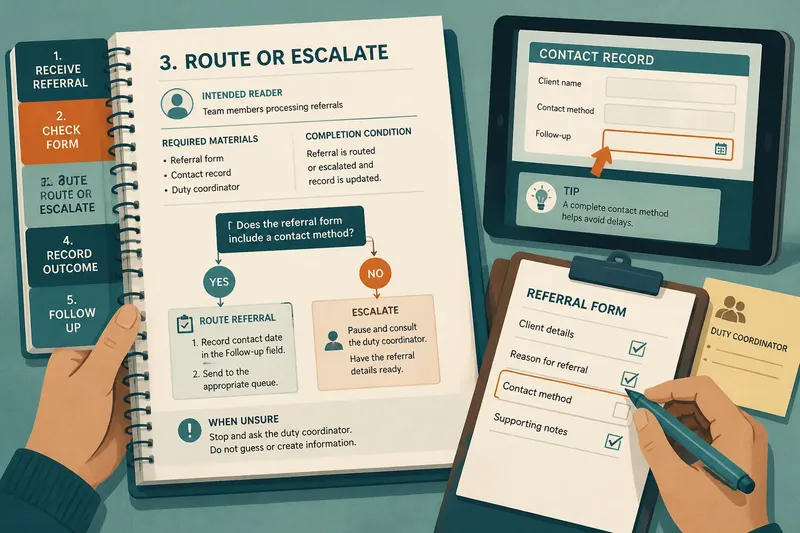
For each task, identify the intended reader, required materials, actions and completion condition. If a process depends on a form or screen, name it precisely and show where the relevant field or control appears. A short instruction such as “record the contact date in the Follow-up field” is easier to act on than “complete the record”.
Make decisions visible
Instructions need to show where a reader must choose a route, not just list actions in sequence. Separate required actions from optional tips, and state what to do when information is missing, a form will not accept an entry or the reader is unsure. Name the person or role to consult and what information to have ready.
Say a team member is using a manual to process a referral. The page lists the referral form, the contact record and the duty coordinator as its hypothetical inputs. The member checks whether the form includes a contact method, follows the ordinary routing instruction when it does, and pauses to ask the coordinator when it does not; the visible outcome is a completed referral for a complete form and a clearly escalated gap otherwise.
Not every unusual case deserves a long branch of instructions. It is not worth the effort to document a rare variation if readers cannot recognise it or act on it appropriately; a clear pause-and-consult instruction is more useful. Keep that boundary explicit, especially where a wrong choice could affect safety, rights or service quality.
Choose useful formats
Match the format to the work. A numbered list suits a fixed sequence; a table can compare options; a labelled screenshot can identify a field in software; and a decision tree can make branching rules easier to scan. Use photographs only when the detail that matters is visible, and add a caption that tells the reader what to inspect.
For a short task, a one-page job aid may be quicker to consult than a chapter. For a process with linked tasks, a manual can provide the wider context and point to the relevant job aid. Avoid repeating the same instruction in several places: duplication makes later updates harder and can leave staff unsure which wording to trust.
Check each instruction
Review a draft by following it as a reader would, using the actual form, software or materials it names. For every item, note the observation and decide what revision follows. If the instruction does not name an action, object or decision clearly, replace it with language that does.
- Check whether the heading names a recognisable workplace task; if it does not, rename it using staff’s task language, or add that wording as a searchable cross-reference.
- Check whether each action identifies its object, such as a field, form or record; if the object is vague, name it, or remove the instruction if no specific action is intended.
- Check whether a required choice states its condition; if it does, retain the rule and route, or add an explicit condition and an alternative action where it does not.
- Check whether the named form or screen matches the current work; if it does, keep the reference, or replace it with the current name and location if it does not.
- Check whether a reader can tell when to stop and ask for help; if the responsible role and next action are clear, retain them, or name both if either is missing.
- Check whether the page is easy to scan during the task; if readers can locate actions and exceptions quickly, keep the layout, or split dense prose into headings, lists or a decision table if they cannot.
Keep versions trustworthy
A manual can become unreliable when forms, software or responsibilities change but old copies remain in circulation. Give the document an owner, an approval status and a version label that readers can identify. State where the current copy lives and what to do if a printed page conflicts with it.
Link review to changes in the work rather than editing for its own sake. When a process changes, check every affected instruction, screenshot, form name and cross-reference. Remove obsolete copies from shared folders and binders where possible, and make the replacement easy to find.
A wording correction may need only an edit and a notice. A change to the task itself may require a briefing, supervised practice or an assessment by someone qualified to judge the work. The manual can explain the settled process, but revising text alone does not establish that a learner is ready to perform it.
Questions about manuals?
What belongs in a training manual?
Include the actions, materials, decision points, completion conditions and escalation route a reader needs for the task. Add reference information such as definitions or screenshots where it helps someone act correctly, and move unrelated background elsewhere.
How can a manual be easier to search?
Use task-based headings, consistent terms, a contents page and searchable text in digital versions. In print, add an index or tabs, and ensure page titles make sense when a reader lands on one page without its neighbours.
When should a job aid replace a manual section?
Use a job aid when readers need a concise prompt for a stable task and do not need extensive context at that moment. Keep the fuller manual as the source for related rules, exceptions and explanations, with a clear link between the two.
How should staff handle a mismatch?
Tell readers which approved source takes precedence and who can resolve uncertainty. If a conflict could affect safety, legal duties or another significant matter, they should pause and seek advice from the responsible qualified person rather than choose a version themselves.
Support the work
A well-shaped training manual makes the right information easier to retrieve and the limits of an instruction easier to see. Its value lies less in how much it contains than in whether a reader can locate the relevant task, make the stated decision and recognise when the page is not enough.
When revising a training manual, start with one task that staff regularly need to look up. Follow its instructions against the current forms and workplace language, then check that every branch leads to a clear action or a named person who can help. That small review can make the manual a more dependable reference without turning it into a record of every conversation.